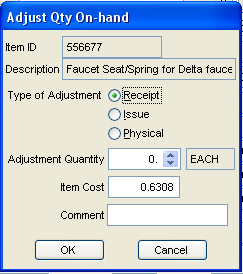
The Adjust Quantity feature allows the user to alter the on-hand level of the current item by an inventory issue, inventory receipt, or physical count.
 Item ID and DescriptionThe item ID and description are displayed.
|
 Last PhysicalThis shows the date and time a physical adjustment was last made to this item.
|
 Adjustment Type-
Receipt: The on-hand quantity is increased by the quantity entered. -
Issue: The on-hand quantity is decreased by the quantity entered. -
Physical: The on-hand quantity is changed to the quantity entered.
|
 QuantityEnter the quantity of the adjustment per the display unit.
|
 Item CostThe current item cost is displayed.
|
 CommentEnter a comment regarding the adjustment.
| | For receipt and issue adjustments, a comment must be entered or the adjustment cannot be completed. A physical adjustment does not require a comment.
|
|
Once you have entered all the applicable information, click OK to complete the adjustment.
| | If issue reasons have been entered in IC | Support Files | Issue Reasons, you are prompted to select an issue reason. The reason code not only provides additional text within reporting but also within the indicated general ledger posting for the type of transaction selected. |