Local Only Control - Item Level Price Control
What does "Local Only" mean when it comes to retail prices as seen in IC > General tab ?
When the IC > Inventory File > General tab > Priced Locally option is "Checked", the local store retains control of the stated retail price. The MultiStore application does not have influence over the Retail Price of the item.
 Check "Priced Locally" for protected local pricing of an itemTo exclude an item from a price update created an another store, checking the "Priced Locally" option located on the General tab of the item. When this option is checked, the system will not allow the retail price to be changed by the incoming a price when the IC > Maintenance > Price Print/Update > Refresh List selected.
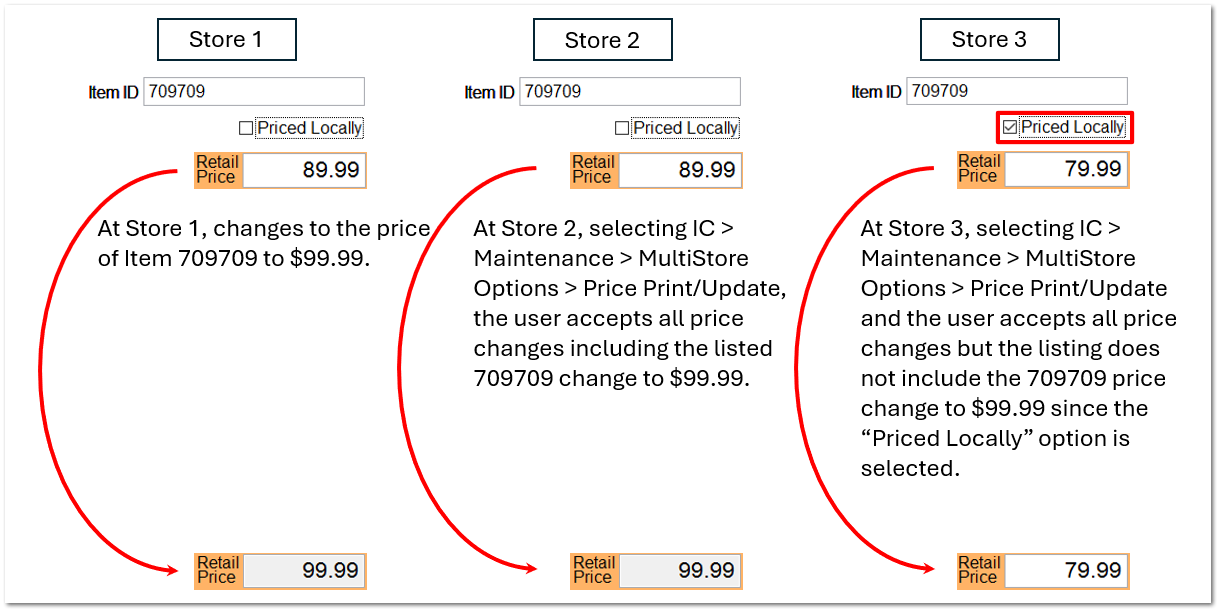
For example, if store 3 has 10 items that are set to "Priced Locally" and Store 1 processes an ecatlog price control containing 100 items, the MultiStore application automatically publishes to the all stores the multiple price updates. At store 3, none of the 10 "Priced Locally" items will not be changed during the process of IC > Maintenance > Price Print/Update process.
|