Minimum Purchase
A minimum purchase coupon has the following characteristics:
-
They reduce the retail price of a sale by the indicated discount.
-
The terms require the customer to purchase at least a specified amount of retail merchandise before the coupon is applied to the purchase.
-
The resulting discounted invoice reflects a reduced sales tax amount based upon a reduced retail sale.
Setting Up the Coupon
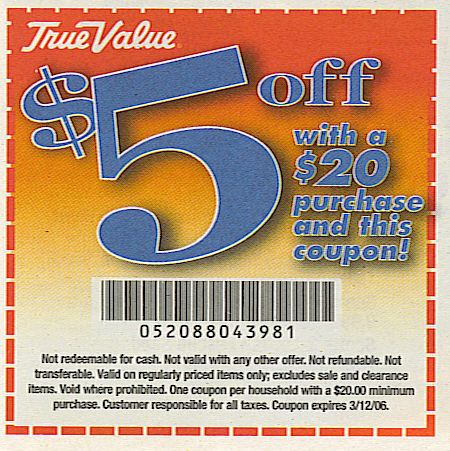
A minimum purchase coupon is created like any other coupon. The following coupon is used as an example:
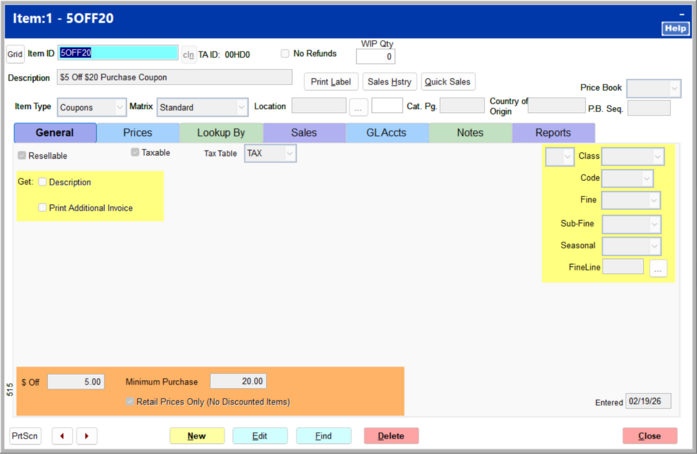
Create a new inventory item for the coupon, and set it up as follows.
-
Enter an item ID and description.
-
Set the item type to Coupons, and leave the matrix set to Standard.
-
Enter the dollar amount off (5.00) and the minimum purchase amount (20.00).
-
On the Lookup By tab, enter the UPC. In this example, the UPC is provided on the coupon itself.
-
Select the correct class if applicable. Creating a coupon class allows for easy tracking within the Daily Sales report.
-
On the GL Accts tab, select the correct GL accounts to attribute the coupon to.
Within the Classification Information screen, apply your assigned class to the coupon. You may want to create a "Coupons" class to easily track the coupon within the Daily Sales report. Select Next.
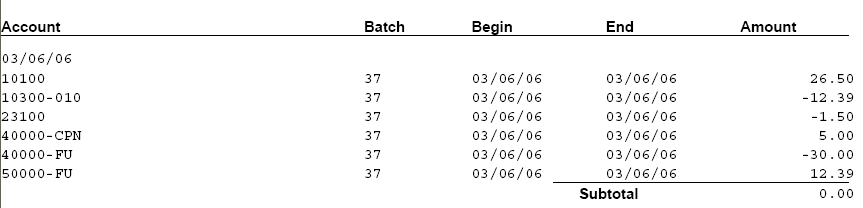
Within the GL Account Information, assign the Sales Link Code as determined by your accounting staff. In this example, a GL Sales Code of "DEF/CPN" was created to direct coupon activity to account 40000-CPN.
Enter any miscellaneous information regarding the coupon within the Notes and Picture screen. Select Save to complete the creation of the coupon item.
With the "5-OFF" item entered in to the system, a couple of edits are required due to the nature of the coupon.
-
Enter a "Minimum Purchase" amount for the item.
-
Check the "Retail Prices Only (No Discounted Items) option
Note: No matter the type of coupon, you must make the Matrix type on the coupon match the coupon type. For example, by default, a coupon has the $ Off field with a Matrix of None. This coupon will not work unless you change the Matrix to Cash Value.
|
Sample Sale using a Minimum Purchase Coupon
To confirm the behavior of the Minimum Purchase Coupon, create an invoice with a retail value less than the coupon minimum and add the coupon. Select End Sale to complete the transaction. Since the retail amount is below the Minimum Purchase indicated within the coupon parameters, the following prompt indicates that the required minimum purchase has not been met and the user will be returned to the invoice screen.
When the minimum coupon's requirements have been meet, the invoice will look similar to the one below.
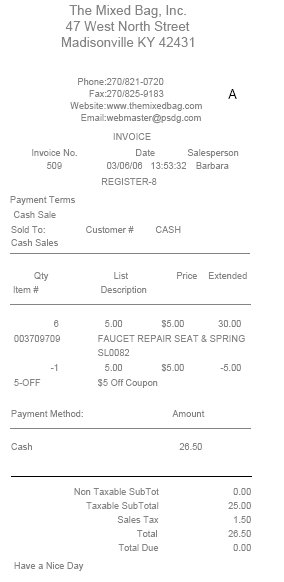
When the minimum coupon's requirements have been meet, the invoice will look similar to the one below.
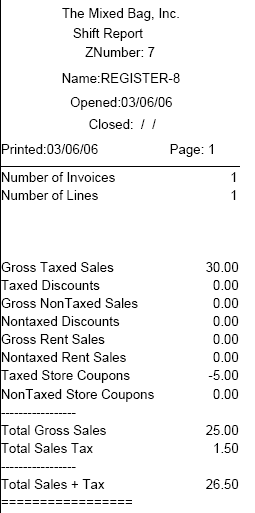
The Shift Report for the workstation processing the coupons will indicate the activity of the coupons redemption within the "Taxed Store Coupons" total.
If the coupon was configured as a non-taxed coupon, it would result in posting within the "Non-Taxed Store Coupons total.
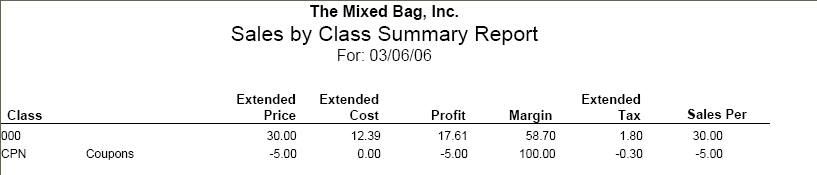
The Sales by Class Summary Report will recognize the activity generated by the coupon redemption activity within the assigned class for the coupon.

The Shift Report for the workstation processing the coupons will indicate the activity of the coupons redemption within the "Taxed Store Coupons" total.
The General Ledger release for this example is shown below. Note the use of the "40000-CPN" account